Articles ·
How to put speed dial on your home screen
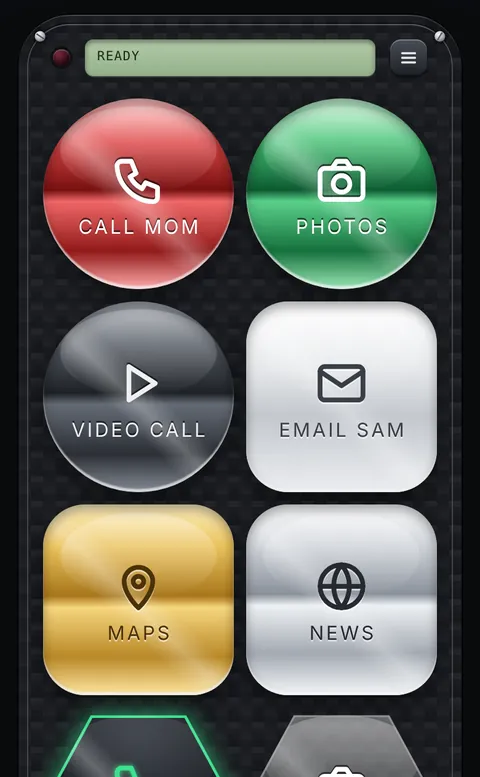
Phones used to have speed dial: hold down 2 to call Mom. Smartphones can do the same thing, just in a different place. Here are three ways, from built-in to custom.
iPhone
- Favorites: in the Phone app, tap Favorites, then + and pick a contact. Their number is now two taps away.
- A home-screen icon with Shortcuts: in the Shortcuts app tap +, add the Call action and choose the contact. Tap the shortcut's name, choose Add to Home Screen, and you get an icon that calls them in one tap.
- Repeat for Send Message if you text them more than you call.
Android
- Direct dial widget: many phones have one. Press and hold an empty spot on the home screen, choose Widgets, find Contacts (or Phone), and drag Direct dial or Direct message to the screen. Pick the person.
- Contact shortcut: in the Contacts app, open a person, tap ⋮ and Add to Home screen. This opens their contact card, which has call and text buttons.
- Names of these options differ between phone makers, but almost every Android phone has one of them.
A speed dial screen for the whole family
One icon per person fills up your home screen quickly. Penzap puts everyone on one screen of big, labeled buttons instead:
- Create a free account at penzap.com on your phone.
- Tap Edit, tap a button, and set When tapped to Call a number or Text a number. Type the number and a label like Mom.
- Add a button for each person, plus anything else you use often, like a video-call app.
- Choose Big buttons at 2× or 3× in Remote size if you want them larger.
- Tap Use and add Penzap to your home screen.
You can put each person's photo on their button, so even kids who can't read yet know who they're calling. See the photos on buttons guide.
Phone numbers stay in your Penzap account. They're never included if you share a remote in the public gallery.