Articles ·
How to send an "on my way" text before you drive
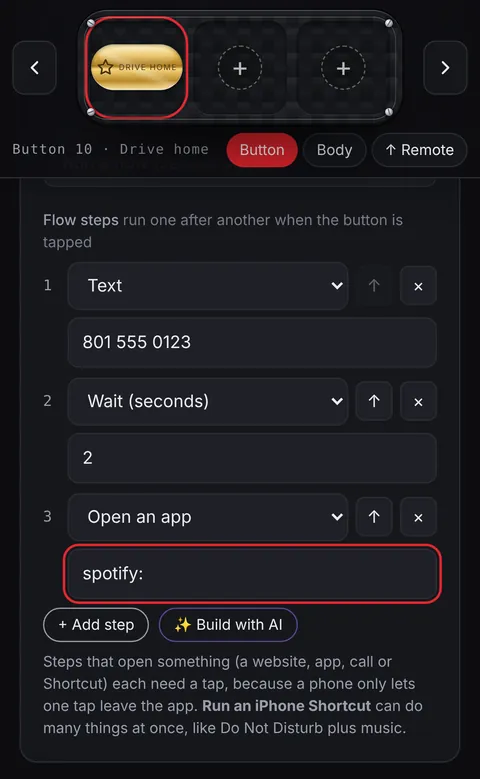
"Leaving now, see you in 20" is one of the most common texts there is, and it's the one you shouldn't type while driving. Set it up once and it takes a tap before you pull out.
Share your arrival time from the map
- Apple Maps: start directions, then tap Share ETA and choose people. They get a message with your arrival time, and another if you're running late.
- Google Maps: start navigation, tap the arrow at the bottom, then Share trip progress and pick a contact.
Automatic replies while you drive
- iPhone: the Driving Focus (Settings → Focus → Driving) can turn on by itself in the car and auto-reply to texts that you're driving.
- Android: many phones have a driving mode or routine that silences notifications. Look in Settings for Driving mode or Modes and Routines.
A text that's already written: iPhone Shortcuts
In the Shortcuts app, add Send Message, type "On my way" and pick the person. Turn off Show When Run and it sends without another tap. Add it to your home screen or run it from your car's Bluetooth automation.
One button for the whole drive
A Penzap car remote puts big buttons for Directions home, Drive music and a Text to your family on one screen. A Drive home flow does them in order from one button. On iPhone, a flow step can run the "On my way" shortcut above, so the text is sent for you. On Android, the text step opens a new message to that person, ready to send.
Set everything up before you drive, and follow local laws. Most places don't allow handling a phone while driving.