Articles ·
How to run several steps with one tap on iPhone and Android
Lots of things you do on your phone are the same few steps every time: open the weather, then the news, then music. Your phone can do a series of steps from one tap. Here's what's built in, and what Penzap adds.
iPhone: the Shortcuts app
Shortcuts is built into every iPhone. Tap +, add actions (like Get Weather, Send Message, Play Music), and run them all with one tap, from a home-screen icon or by asking Siri. Automation can run shortcuts on their own, for example when you connect to your car's Bluetooth.
Android: routines
- Google Assistant routines (in the Google app or Google Home) run several actions when you say a phrase like "Good morning".
- Samsung Modes and Routines (Settings → Modes and Routines) change settings and open apps when something happens, like plugging in headphones.
Penzap flows: a routine on a button you design
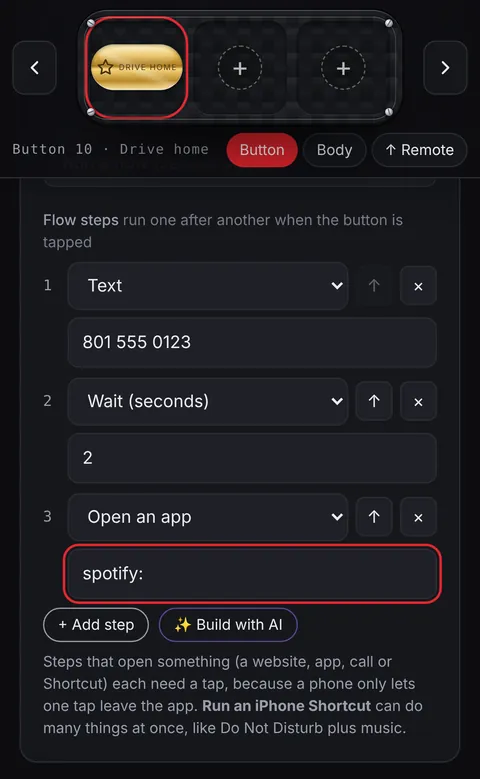
A flow is a Penzap button that runs up to 8 steps in a row. A step can:
- open a website or an app, or start a call, text or email,
- send a Roku remote command (in the Penzap app, on the same Wi-Fi),
- run an iPhone Shortcut, copy text, show a note, or wait a few seconds.
Steps that stay in Penzap, like notes, waiting and Roku commands, run on their own. Phones only let an app open another app when you tap, so a step that opens an app or a call shows a button to tap, and then you come back for the next step. On iPhone, one Run an iPhone Shortcut step can do many things at once.
Ideas to start with
| Routine | Steps |
|---|---|
| Morning | Weather, news site, then your playlist |
| Drive home | Text family, then open directions home |
| Movie night | Turn on the Roku, open your streaming channel, show the snack list |
| Leaving work | Open your bus or train app, then text "On my way" |
You can build a flow step by step, or describe it in plain words and let Penzap's AI designer write the steps.