Penzap · Low vision and talking buttons
A phone screen for people who can't see it well
Small, low-contrast icons are hard to read with poor eyesight, cataracts or macular degeneration, and a wrong tap can call the wrong person. Penzap gives the people and apps that matter their own huge button that you can see, hear and check before it does anything. All of it is free.
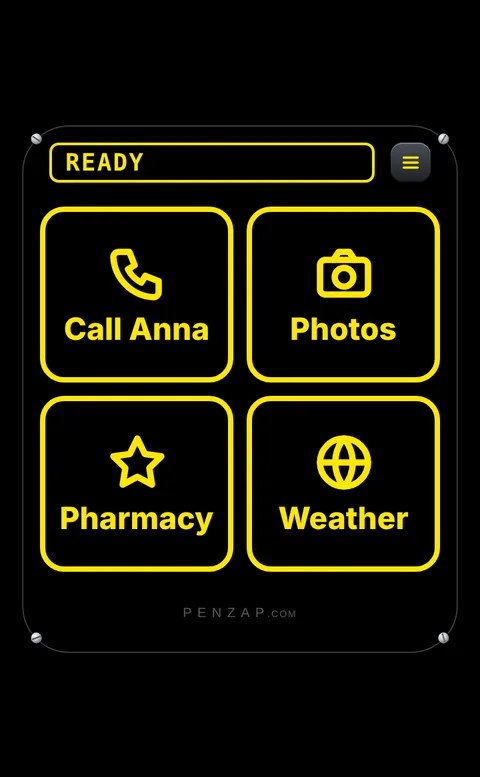
See it
- High contrast: bold yellow-on-black or white-on-black buttons with huge labels, a combination many people with low vision find easiest to read.
- Big buttons: two per row, or one per row across the whole screen.
- Your own words on each button: "Call Anna", "Pharmacy", "Video call".
Hear it
- Talking buttons: each button says its name out loud when it's tapped, using the phone's own voice. Slow, normal or fast.
- Press and hold to check: hold a button and it fills the screen and says what it does, like "Call Anna?". Nothing happens unless you tap Yes.
- A sound and buzz for each button: every button has its own note and vibration pattern, so you can tell them apart without looking.
- Works with VoiceOver and TalkBack: each button tells the screen reader what it does, like "Anna, calls 555 0142".
No more wrong calls
- Ask before it acts: for calls and texts (or every button), Penzap shows "Call Anna?" with a big green Yes and a big No.
- A quick double tap can't press Yes by accident.
Set it up for someone (about 10 minutes)
- Open penzap.com on their phone, or get the Penzap app, and create a free account.
- Tap a button to edit it: give it a short Label and set When tapped, for example Call a number. Keep it to the 4–8 buttons they really use.
- Open Easy to see and hear and turn on what helps: High contrast, Talking buttons, Ask before it acts for calls and texts.
- Tap Use. In the app it opens straight to these buttons; on the web, add Penzap to the home screen.
- The settings are saved with the remote, so you can make changes from your own phone or computer later and they show up on theirs.
Good to know
- Everything on this page is free.
- On Android the voice needs the latest Penzap app from Google Play. On iPhone and on penzap.com it uses the phone's or browser's voice.
- Penzap works alongside your phone's own settings, like bigger text, Zoom or Magnifier. See how to set up a simple phone for seniors.